

Choosing the right keywords is one of the most important steps in building a successful Google Ads campaign. If you target keywords that your potential customers are not searching for, your advertisements may generate very little traffic. Similarly, choosing highly competitive keywords without understanding their costs can quickly increase your advertising budget.
This is where the google ads key planner becomes useful. Google’s Keyword Planner is a free keyword research tool within Google Ads that helps advertisers discover search terms, understand estimated search demand, explore competition and plan advertising budgets.
Whether you are a small business owner, digital marketer, freelancer or PPC specialist, understanding how to use the google ads key planner can help you make more informed advertising decisions.
In this guide, we explain how the tool works, how to find relevant keywords, how to understand search volume and competition, and how to use keyword insights to improve your advertising campaigns.
What Is Google Ads Keyword Planner?
Google Ads Keyword Planner is a keyword research and planning tool provided by Google. It helps advertisers discover relevant keywords that people may use when searching for products, services or information.
The google ads key planner is particularly useful when preparing a new advertising campaign because it provides estimates and insights that can help you select relevant search terms.
Its main capabilities include:
- Discovering new keyword ideas.
- Reviewing average monthly search estimates.
- Understanding advertising competition.
- Exploring estimated bid ranges.
- Identifying keyword trends and seasonal demand.
- Creating keyword lists for advertising campaigns.
- Planning advertising budgets.
For example, a company offering digital marketing services might research terms such as:
- Digital marketing agency.
- SEO services.
- Google Ads management.
- PPC advertising services.
- Local SEO agency.
These keyword suggestions help advertisers understand how potential customers search for relevant services.
Why Is Google Ads Keyword Planner Important?
Successful advertising requires more than simply writing an attractive advertisement. You need to understand what your target audience is searching for and whether those searches are relevant to your business.
Using the google ads key planner can help you make better decisions before spending money on advertisements.
Here are some important benefits.
1. Discover Relevant Keyword Ideas
The tool helps identify search terms related to your products and services. You can enter a product name, service category or website URL to discover potential keywords.
For example, an online clothing store might enter:
- Women’s clothing.
- Summer dresses.
- Affordable fashion.
- Online clothing store.
The tool can generate related keyword ideas that may help expand your advertising strategy.
2. Understand Search Demand
Search volume estimates help advertisers understand how frequently people search for particular keywords.
A keyword with higher search demand may offer greater traffic potential. However, search volume alone does not guarantee conversions.
A more specific keyword with lower search volume may attract people who are closer to making a purchase.
3. Estimate Advertising Costs
Keyword Planner provides estimated bid information that can help advertisers understand potential advertising costs.
These estimates are useful when comparing keywords and planning campaign budgets.
However, actual cost-per-click (CPC) depends on factors such as competition, ad quality, bidding strategy, location and auction conditions.
4. Identify Advertising Competition
The tool provides competition indicators for advertisers.
These indicators generally describe the level of competition among advertisers bidding for a keyword, rather than measuring organic SEO difficulty.
Understanding this distinction is important when using the google ads key planner for both paid advertising research and broader keyword planning.
5. Improve Campaign Planning
Instead of choosing keywords randomly, advertisers can organise their research into relevant groups.
For example, a marketing agency could separate keywords into:
- SEO services.
- PPC management.
- Local advertising.
- E-commerce marketing.
- Google Ads management.
This makes it easier to create relevant advertisements and landing pages.
How to Access Google Ads Keyword Planner
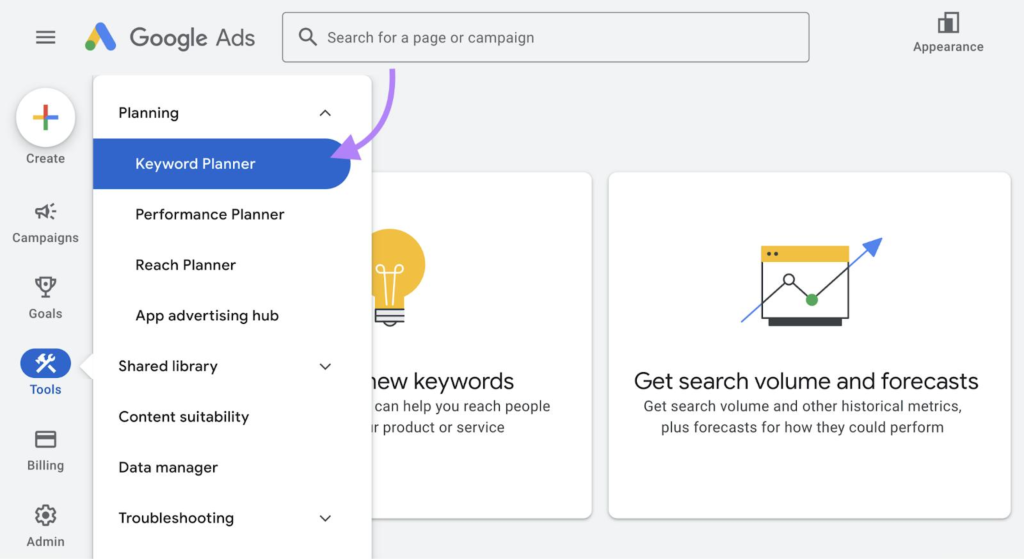
Accessing the tool is straightforward.
Follow these steps:
- Visit the official Google Ads website.
- Sign in using your Google account.
- Create or access your Google Ads account.
- Open the Tools section.
- Find the Planning category.
- Select Keyword Planner.
- Choose the keyword research option you want to use.
Google may require account setup before you can access all features. Some functionality and data availability may also depend on your account status.
The google ads key planner is available through the Google Ads platform, so you do not normally need to purchase a separate keyword research subscription.
How to Use Google Ads Keyword Planner
Understanding the available features will help you get more value from your keyword research.
Step 1: Discover New Keywords
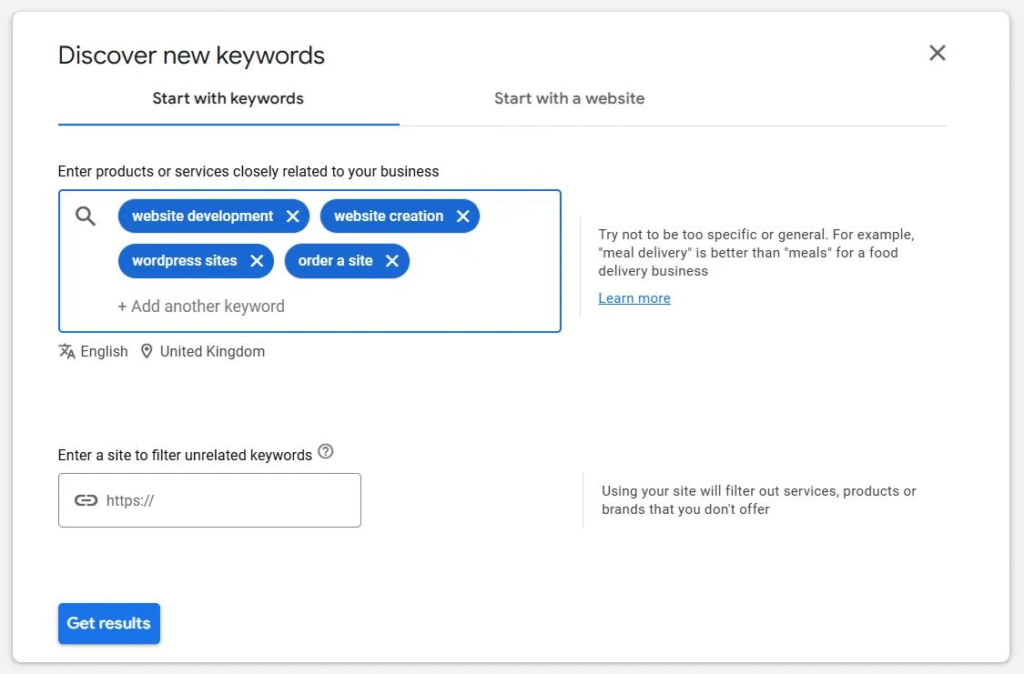
Open Keyword Planner and select Discover new keywords.
You can begin your research in two ways:
Start with keywords: Enter words or phrases that describe your products or services.
Start with a website: Enter a website URL to discover keyword ideas associated with its content.
For example, if you operate a digital marketing agency, you could enter:
- SEO agency.
- PPC services.
- Google Ads management.
- Digital marketing company.
Review the suggestions and identify keywords that closely match your services.
Step 2: Analyse Average Monthly Searches
Average monthly searches provide an estimate of how frequently people search for a keyword.
For example, consider these hypothetical keyword figures:
| Keyword | Example monthly searches |
|---|---|
| SEO services | 5,000 |
| PPC agency | 1,200 |
| Google Ads management | 900 |
| Local SEO services | 700 |
These figures are illustrative, not live Google data.
When analysing search volume, consider the following:
- Is the keyword relevant to your business?
- Does it attract your target audience?
- Is the search intent commercial or informational?
- Can your business provide what the searcher needs?
A keyword with fewer searches can sometimes generate better leads than a broad keyword with a much larger audience.
Step 3: Understand Competition Levels
Keyword Planner provides competition indicators such as low, medium and high.
These indicate advertiser competition within Google Ads.
For example:
- Low competition: Fewer advertisers are competing for the keyword.
- Medium competition: A moderate level of advertiser activity exists.
- High competition: More advertisers are bidding for the keyword.
Remember that advertising competition is not the same as organic SEO difficulty. A keyword can have high advertising competition but still be relatively achievable in organic search.
Step 4: Review Top-of-Page Bid Estimates
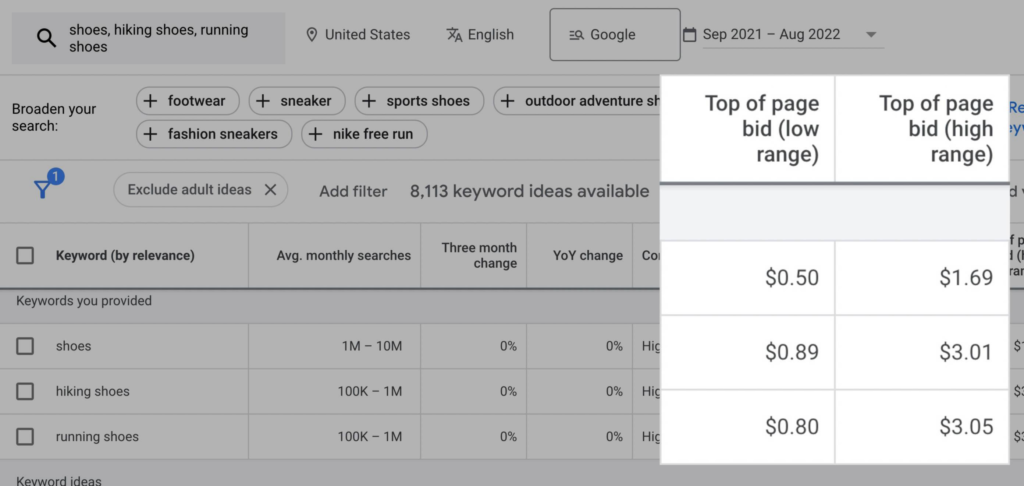
The tool may display low-range and high-range top-of-page bid estimates.
These figures provide an indication of what advertisers have historically bid for prominent ad positions.
For example:
| Keyword | Low-range bid | High-range bid |
|---|---|---|
| SEO agency | £2.00 | £7.00 |
| PPC management | £3.00 | £9.00 |
| Digital marketing services | £1.50 | £6.00 |
These are hypothetical examples, not actual current bid estimates.
Use this information to compare potential advertising costs and identify keywords that fit your budget.
Step 5: Select Your Target Keywords
Once you have reviewed the suggestions, create a list of relevant keywords.
Prioritise keywords based on:
- Relevance to your products or services.
- Search demand.
- Commercial intent.
- Estimated advertising costs.
- Geographic targeting.
- Competition levels.
Avoid selecting keywords simply because they have high search volume.
The google ads key planner works best when keyword selection is connected to your campaign objectives.
Step 6: Organise Keywords into Groups
Group similar keywords together to create more relevant advertising campaigns.
For example, a digital marketing agency could create separate groups for SEO services, PPC management and local advertising.
This approach helps align keywords, advertisement messaging and landing pages.
For additional campaign support, explore BoostRankify’s Google Ads services.
Google Ads Keyword Planner vs Other Keyword Research Tools
Several tools support keyword research, but their features and purposes differ.
| Tool | Main purpose |
|---|---|
| Google Ads Keyword Planner | Advertising keyword discovery and bid estimates |
| Google Search Console | Analysing existing organic search performance |
| Google Trends | Exploring search interest over time |
| Ahrefs | SEO keyword and backlink research |
| Semrush | SEO and competitive keyword analysis |
The google ads key planner is particularly valuable for advertisers who want keyword ideas and advertising estimates directly from Google’s advertising platform.
However, combining multiple research tools can provide a more complete understanding of search behaviour.
For broader organic keyword planning, consider BoostRankify’s SEO services.
Google Ads Keyword Planner for Local Businesses
Local businesses can use keyword research to identify searches connected to their services and locations.
For example, a business operating in London might investigate:
- SEO agency London.
- PPC management London.
- Digital marketing agency London.
- Google Ads consultant London.
Similarly, a business targeting customers in Dubai could explore location-specific searches.
The google ads key planner allows users to adjust location and language targeting, helping advertisers research keywords for particular markets.
Businesses targeting different regions should create keyword groups that reflect local search behaviour.
You can explore BoostRankify’s SEO services in London and SEO services in Dubai for additional regional marketing insights.
Google Ads Keyword Planner Tips for Better Results
Getting useful information from keyword research requires a structured approach.
Here are some practical tips.
Focus on Search Intent
Search intent describes the reason behind a person’s search.
For example:
- Informational: What is PPC advertising?
- Commercial: Best PPC agency.
- Transactional: Hire Google Ads expert.
If your objective is generating enquiries, prioritise relevant commercial and transactional searches.
Use Specific Keywords
Broad keywords can attract unrelated visitors.
For example, instead of targeting only “marketing”, consider more specific terms such as “Google Ads management for small businesses”.
Specific keywords can help improve advertising relevance.
Consider Negative Keywords
Negative keywords prevent advertisements from appearing for unwanted searches.
For example, a paid SEO agency may want to exclude terms such as:
- Free jobs.
- SEO salary.
- SEO courses.
- Internship.
Review search terms regularly and add appropriate negative keywords to reduce irrelevant traffic.
Check Seasonal Trends
Some keywords experience seasonal changes in search demand.
For example, retail searches may increase during holiday shopping periods, while travel-related searches may rise during popular travel seasons.
Use historical trends to plan campaigns, but remember that past search activity does not guarantee future performance.
Review Your Keyword List Regularly
Search behaviour, competition and advertising costs can change.
Review keyword performance regularly and update your campaigns based on impressions, clicks, conversions and cost.
Common Mistakes to Avoid When Using Keyword Planner
Even with a useful research tool, poor keyword decisions can reduce campaign performance.
Avoid these common mistakes:
- Choosing keywords only by search volume: High search volume does not automatically mean high-quality leads.
- Ignoring search intent: A keyword may attract visitors who are researching rather than looking to purchase.
- Confusing PPC competition with SEO difficulty: These are different measurements.
- Ignoring location targeting: Search demand in one country or city may differ significantly from another.
- Overlooking negative keywords: Irrelevant searches can waste advertising budgets.
- Treating estimates as guaranteed results: Forecasts are predictions, not promises of clicks, conversions or revenue.
The google ads key planner should be treated as a research and planning resource rather than a guarantee of advertising success.
Is Google Ads Keyword Planner Free?
Yes. Google Ads Keyword Planner is available without purchasing a separate keyword research subscription. However, you need a Google Ads account and may need to complete account setup, including billing information, to access basic keyword research features.
The amount of detail available in some search volume estimates can depend on your account activity and other account conditions.
You can check Google’s official Keyword Planner guide for current access requirements. Google Ads Help+1
Can You Use Google Ads Keyword Planner for SEO?
Yes. Although the tool is designed primarily for Google Ads campaigns, its keyword suggestions and search volume estimates can also support organic SEO research.
For example, you can use it to:
- Discover relevant content topics.
- Identify long-tail keyword opportunities.
- Understand potential search demand.
- Compare keyword variations.
- Find location-specific search terms.
- Develop ideas for website landing pages.
However, it does not provide a complete organic keyword difficulty analysis. You should combine its insights with SEO tools and competitor research.
The google ads key planner can therefore support both paid advertising research and your wider search marketing strategy.
For additional organic visibility, explore BoostRankify’s local SEO services and AI SEO services.
How Businesses Can Combine Keyword Research with PPC Strategy
Keyword research is only one part of a successful advertising campaign. Businesses also need relevant advertisements, useful landing pages, appropriate targeting and conversion tracking.
For example, a business selling professional marketing services could:
- Research relevant service keywords.
- Identify commercial search intent.
- Organise keywords into advertising groups.
- Write advertisements that match search queries.
- Direct visitors to relevant service pages.
- Track calls, enquiries and form submissions.
- Review campaign performance and adjust bids.
The google ads key planner helps with the initial research, while campaign management turns those insights into an advertising strategy.
If you want professional support, explore BoostRankify’s PPC services. Businesses can also review its advertising services to understand available digital marketing solutions.
Frequently Asked Questions
1. What is Google Ads Keyword Planner used for?
Google Ads Keyword Planner is used to discover keyword ideas, review estimated monthly searches, analyse advertiser competition and estimate potential advertising costs. The google ads key planner helps businesses make informed decisions before launching Search campaigns.
2. Is Google Ads Keyword Planner free to use?
Yes. It is available within Google Ads without a separate subscription fee. However, you must complete the required Google Ads account setup, including billing information, to access basic keyword research features.
3. Do I need to run an active Google Ads campaign?
You need a properly set-up Google Ads account to access the tool’s basic features. You do not necessarily need to be actively spending money on advertisements to conduct keyword research.
4. Can beginners use Google Ads Keyword Planner?
Yes. Beginners can use the google ads key planner to discover keyword suggestions, compare search demand and understand estimated advertising costs. Its basic workflow is relatively straightforward.
5. Does Keyword Planner show exact search volumes?
It provides average monthly search estimates based on selected targeting settings and historical data. These figures are estimates rather than guaranteed counts of future searches.
6. Is Google Ads Keyword Planner useful for SEO?
Yes. It can help identify keyword ideas, search demand and relevant content topics. However, additional SEO research is necessary to assess organic competition and ranking opportunities.
7. What is the difference between keyword competition and SEO difficulty?
Keyword competition in Google Ads measures advertiser competition for paid placements. SEO difficulty estimates how challenging it may be to rank organically for a keyword. They should not be treated as interchangeable metrics.
8. Can I find local keywords using Keyword Planner?
Yes. You can adjust location and language targeting to research keywords for specific markets, including London, Dubai, Karachi and other locations. This helps businesses identify regionally relevant advertising opportunities.
Conclusion
Google Ads Keyword Planner is a valuable resource for businesses that want to make smarter advertising decisions. From discovering keyword ideas and analysing search demand to reviewing competition and estimating advertising costs, it provides useful information for planning effective Search campaigns.
The google ads key planner can also support wider SEO research when combined with other keyword analysis methods. However, successful campaigns require more than selecting popular search terms. Businesses must understand search intent, create relevant advertisements, optimise landing pages and regularly monitor conversions.
By using keyword research strategically, businesses can improve campaign relevance, manage advertising budgets more effectively and reach potential customers who are actively searching for their products or services.
If you need help with keyword research, PPC campaign planning or improving your online visibility, contact BoostRankify to discuss your digital marketing requirements.