

A site backlinks check is one of the most important activities in an effective SEO strategy. Backlinks are links from other websites that point to your website. They help search engines discover your pages, understand your website’s authority and evaluate how other websites reference your content.
However, simply collecting backlinks is not enough. You need to understand where your backlinks come from, which websites link to you, what anchor text they use and whether those links contribute positively to your SEO performance.
A proper site backlinks check helps you identify valuable referring domains, discover potentially harmful links, monitor competitors and find new link-building opportunities.
Whether you manage a small business website, an eCommerce store or a large digital platform, regularly checking your backlink profile can help you make better SEO decisions.
In this guide, we explain how to check every link pointing to your website, which tools to use, how to understand backlink reports and how to improve your overall link-building strategy.
What Is a Site Backlinks Check?
A site backlinks check is the process of examining external links that direct visitors and search engines to your website.
These links are commonly called inbound links or backlinks. They can appear in:
- Blog articles and editorial publications.
- Business directories and local listings.
- Guest posts and industry websites.
- News websites and online magazines.
- Resource pages and educational websites.
- Forums and relevant online communities.
- Partner websites and business profiles.
For example, if a marketing blog publishes an article about SEO agencies and includes a link to your website, that link becomes a backlink.
A comprehensive site backlinks check helps you identify the source of that link and understand how it contributes to your website’s backlink profile.
It is important to remember that not all backlinks offer the same value. A relevant editorial link from a trusted industry website may be more useful than hundreds of unrelated directory links.
Why Is Checking Your Website’s Backlinks Important?
Backlinks remain an important part of SEO analysis. Monitoring them helps you understand your website’s link profile and identify opportunities for improvement.
Here are six important reasons to monitor your backlinks.
1. Understand your website’s authority
Backlink analysis helps you understand which websites reference your content and how your referring-domain profile develops over time.
2. Identify valuable linking websites
A site backlinks check reveals websites that already mention your business. You can build relationships with relevant publishers and explore additional editorial opportunities.
3. Discover potentially harmful links
Unusual link patterns, irrelevant websites and manipulative link-building practices deserve investigation. However, an unfamiliar backlink is not automatically harmful.
4. Monitor your competitors
Examining competitor backlinks can reveal websites, publications and industry resources that may also be relevant to your business.
5. Find lost backlinks
Websites sometimes remove links, delete pages or change URLs. Regular monitoring helps you identify lost links and investigate whether they can be recovered.
6. Improve your link-building strategy
Backlink reports help you identify which content attracts links, which pages need promotion and where your future outreach efforts should focus.
How to Check Every Backlink Pointing to Your Website
You can use several SEO tools to investigate your backlink profile. The best approach is to combine Google’s own reporting with independent backlink databases.
1. Use Google Search Console
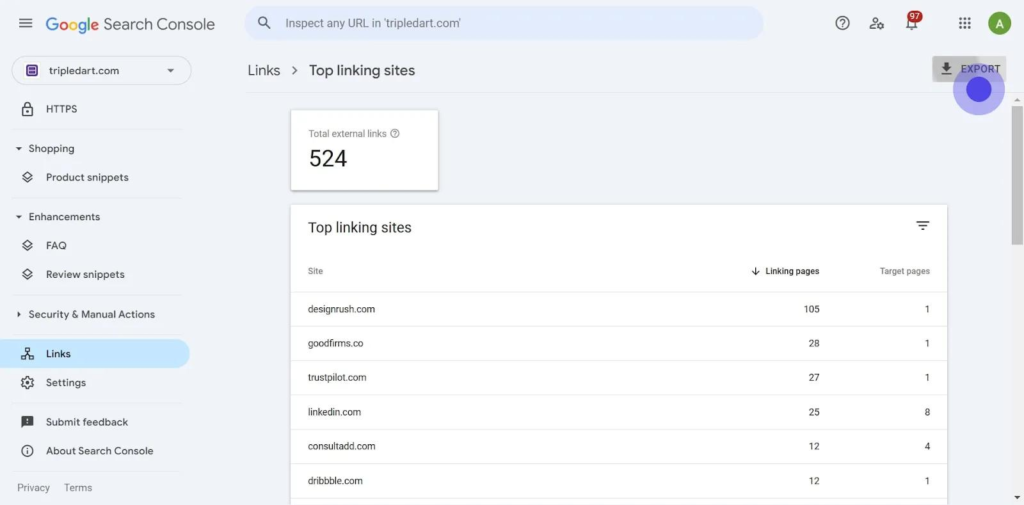
Google Search Console is an excellent starting point for a site backlinks check because it provides information about links Google has discovered.
Follow these steps:
- Open Google Search Console.
- Select your verified website property.
- Find the Links section in the left-hand navigation.
- Open the External Links report.
- Review Top Linked Pages.
- Examine Top Linking Sites.
- Check Top Linking Text.
- Export the available data for further analysis.
You can export link information into a spreadsheet and examine the domains and pages linking to your website.
Important limitation: Google Search Console does not provide a complete list of every backlink. Its Links report contains a sample of links Google has identified, and some data may be omitted. Search Console Help
Nevertheless, it is an essential starting point for understanding your website’s backlink profile.
2. Check Backlinks Using Ahrefs
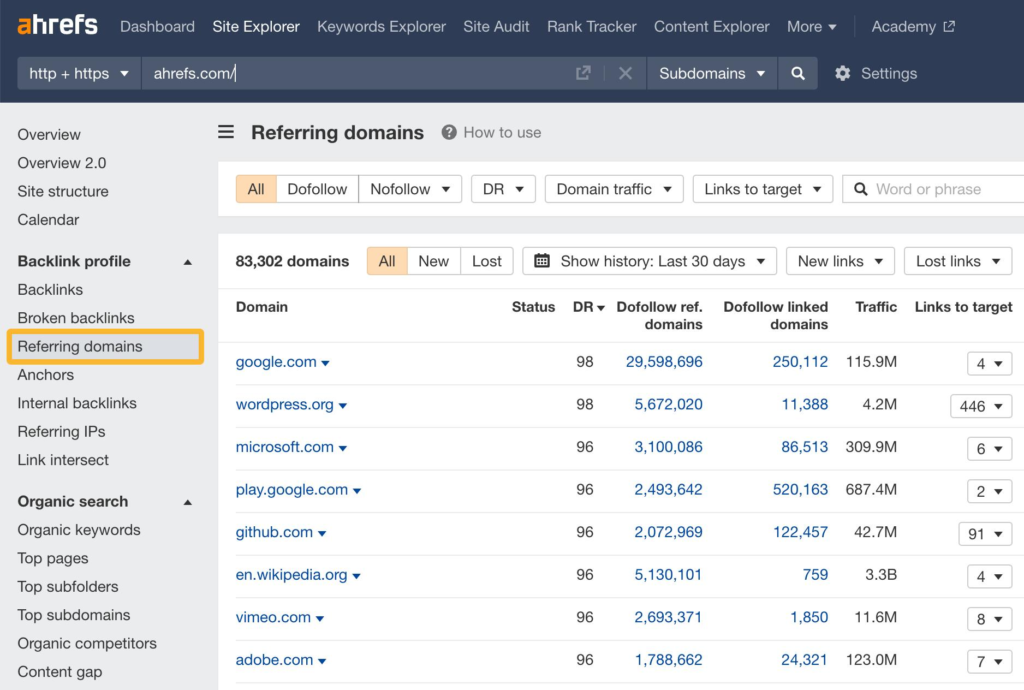
Ahrefs offers backlink analysis through its Site Explorer tool.
To perform a site backlinks check:
- Visit Ahrefs.
- Open Site Explorer.
- Enter your website domain.
- Select the appropriate domain or URL scope.
- Open the Backlinks report.
- Review referring domains and anchor text.
- Examine new and lost backlinks.
- Export the available information.
Ahrefs can help you understand the number of backlinks, referring domains and the websites linking to individual pages.
Its free account provides limited Site Explorer access for verified websites, while its standalone free backlink checker provides a smaller sample. Help Center – Ahrefs+1
3. Use Semrush Backlink Analytics
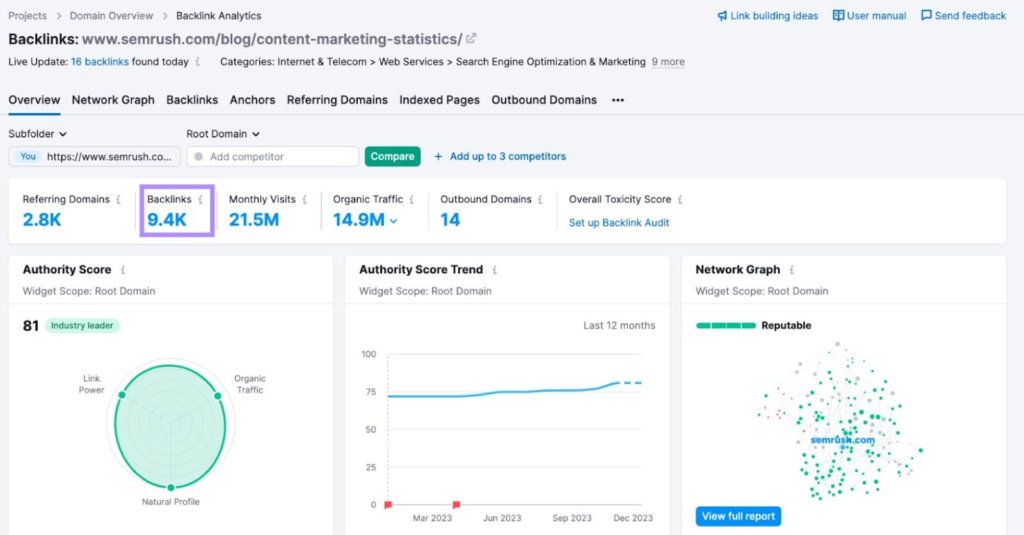
Semrush provides backlink analysis and auditing features.
You can use Semrush to:
- Examine your backlink profile.
- Identify referring domains.
- Review anchor text distribution.
- Compare competitor backlinks.
- Monitor new and lost links.
- Investigate potentially suspicious backlinks.
Its Backlink Audit tool also provides toxicity indicators to help prioritise links for manual investigation.
Remember that a toxicity score is a third-party assessment, not proof that Google considers a link harmful. Semrush+1
4. Explore Moz Link Explorer
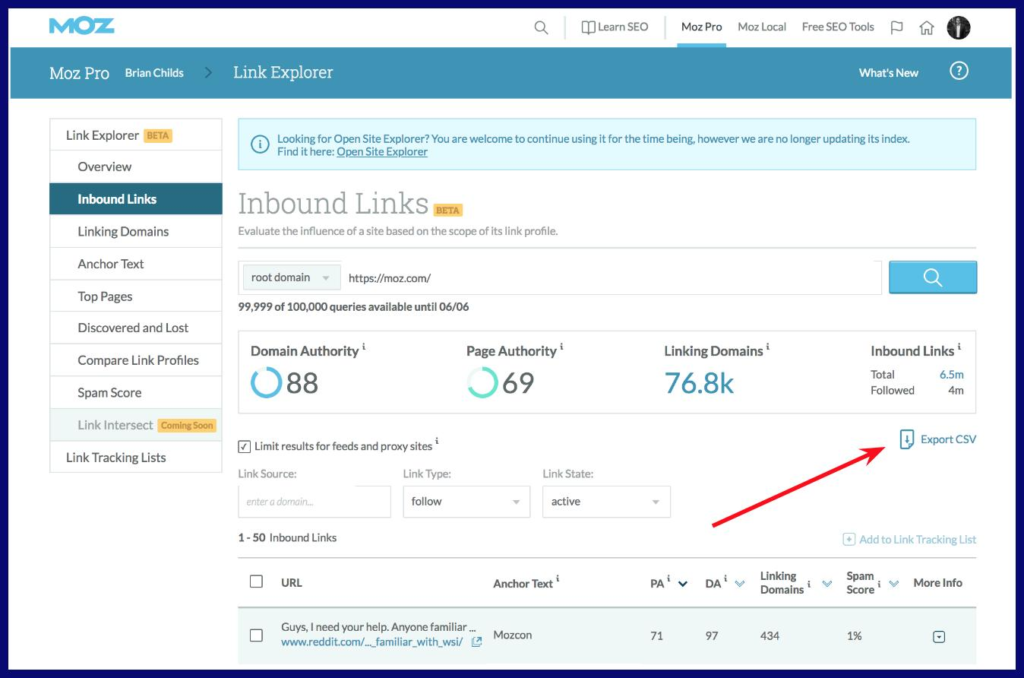
Moz is another recognised SEO platform for backlink research.
Its Link Explorer can help marketers investigate linking domains, discover backlink opportunities and compare website link profiles.
Visit Moz to explore its available backlink analysis features and access options.
5. Compare Multiple Backlink Tools
One tool cannot guarantee that you will discover every link pointing to your website.
Different platforms maintain different link indexes, crawl websites at different times and report different datasets.
For a more complete site backlinks check, combine:
- Google Search Console for Google’s discovered link data.
- Ahrefs for backlink and referring-domain research.
- Semrush for backlink auditing and competitor analysis.
- Moz for additional link research.
Combining these reports provides a broader understanding of your website’s backlink profile.
Which Backlink Metrics Should You Check?
Finding backlinks is only the first step. You must also understand the information included in backlink reports.
| Backlink metric | What it tells you |
|---|---|
| Total backlinks | Number of discovered links |
| Referring domains | Unique websites linking to you |
| Domain authority metrics | Third-party estimates of website strength |
| Anchor text | Clickable text used in backlinks |
| Follow and nofollow | Link attributes |
| New backlinks | Recently discovered links |
| Lost backlinks | Links no longer detected |
| Target pages | Your website pages receiving links |
| Linking pages | Individual pages containing backlinks |
Backlinks vs referring domains: If one website links to your homepage 20 times, that may represent 20 backlinks but only one referring domain.
When performing a site backlinks check, pay particular attention to referring domains, relevance and the quality of the linking pages rather than focusing exclusively on total backlink numbers.
How to Identify Good and Bad Backlinks
Not every backlink deserves the same level of attention. Understanding the difference between useful and suspicious links helps you make better SEO decisions.
Characteristics of valuable backlinks
High-quality backlinks generally have the following characteristics:
- They come from websites relevant to your industry.
- They appear naturally within useful content.
- They provide genuine value to readers.
- They come from legitimate, established websites.
- Their anchor text describes the linked page naturally.
- They direct visitors to relevant website content.
For example, a marketing publication linking to a useful SEO guide is generally more relevant to a digital marketing agency than an unrelated website linking to the same page.
Warning signs of potentially problematic backlinks
Investigate links that involve:
- Unrelated websites with no clear editorial connection.
- Automated link-building networks.
- Excessive exact-match commercial anchor text.
- Paid links designed to manipulate rankings.
- Hidden links or unnatural sitewide placements.
- Large numbers of artificial directory links.
However, do not automatically classify every low-quality-looking backlink as dangerous. Google’s systems can ignore many unnatural or irrelevant links.
Google explicitly identifies buying links for ranking manipulation, excessive link exchanges and automated link creation as examples of link spam. Google for Developers
How to Fix Backlink Problems
If your site backlinks check identifies suspicious links, investigate them before taking action.
Step 1: Review the linking website
Visit the referring domain and examine its content, reputation and relevance.
Step 2: Inspect the linking page
Check whether the backlink appears naturally and whether it provides value to readers.
Step 3: Check the anchor text
Look for repeated commercial keywords, irrelevant phrases or unnatural anchor text patterns.
Step 4: Contact the website owner
If a genuinely problematic link is under your control or was placed through an agreement, request its removal or appropriate qualification.
Step 5: Consider Google’s disavow tool carefully
Google recommends using the disavow tool only in specific circumstances, such as when there are considerable numbers of artificial or low-quality links and a manual action, or a strong likelihood of one, is involved.
Disavowing ordinary unwanted backlinks without proper investigation can be counterproductive.
Read Google’s official link spam policies before taking action.
How to Monitor Your Backlinks Regularly
Backlink monitoring should be an ongoing part of your SEO strategy rather than a one-time activity.
Here is a practical monitoring routine:
| Frequency | Recommended activity |
|---|---|
| Weekly | Review newly discovered and lost backlinks |
| Monthly | Check referring domains and anchor text |
| Monthly | Compare competitor backlink profiles |
| Quarterly | Review suspicious backlink patterns |
| Quarterly | Evaluate link-building campaign performance |
A regular site backlinks check helps you identify changes before they become larger SEO problems.
You should also maintain a spreadsheet containing:
- Referring domain.
- Linking page URL.
- Target page URL.
- Anchor text.
- Link attribute.
- First discovered date.
- Current link status.
- Notes about relevance and quality.
This makes it easier to compare backlink reports and identify opportunities.
How to Find Competitor Backlinks
Competitor backlink analysis is another useful way to improve your SEO strategy.
Start by identifying three to five businesses competing for the same search terms. Enter their domains into an SEO analysis platform and examine their referring domains.
Look for:
- Industry publications linking to competitors.
- Websites publishing relevant guest articles.
- Business directories listing competing companies.
- Resource pages mentioning competing services.
- Websites linking to multiple competitors but not your business.
These findings can help you develop a targeted outreach strategy.
For example, if several competitors receive links from digital marketing publications, you can approach relevant publishers with original research, useful guides or expert contributions.
BoostRankify also offers guest post services and access to guest post sites to help businesses explore relevant publishing and link-building opportunities.
How to Build a Stronger Backlink Profile
Once your site backlinks check is complete, focus on attracting relevant and natural backlinks.
Consider these strategies:
1. Publish link-worthy content
Create detailed guides, original research, industry statistics and useful resources that other websites may want to reference.
2. Contribute guest articles
Write informative articles for relevant publications. Prioritise editorial quality and audience relevance instead of pursuing links purely for SEO metrics.
3. Build business citations
Accurate business information across relevant directories can improve online visibility and help potential customers discover your business. Explore our guide to free business listing sites.
4. Develop industry relationships
Connect with publishers, professional organisations and businesses in your industry to create genuine collaboration opportunities.
5. Improve existing content
Update outdated articles, add useful information and make your resources more valuable to readers.
6. Strengthen your overall SEO strategy
Backlinks work alongside technical SEO, content quality, user experience and internal linking. Explore our SEO services to understand how a comprehensive optimisation strategy can support your website’s growth.
Common Backlink Checking Mistakes to Avoid
Even experienced website owners can make mistakes when analysing their backlinks.
Avoid these common problems:
- Focusing only on backlink quantity: More links do not automatically mean better SEO.
- Ignoring referring domains: Multiple links from one domain are not the same as links from multiple relevant websites.
- Trusting authority scores blindly: Third-party metrics are estimates, not Google ranking scores.
- Disavowing links unnecessarily: Investigate suspicious links before submitting a disavow file.
- Ignoring lost backlinks: Some valuable links can disappear after website updates or deleted pages.
- Using only one SEO tool: Different tools discover and report different backlinks.
- Buying manipulative links: Link schemes can violate Google’s spam policies.
A successful site backlinks check should help you understand your actual link profile rather than encourage unnecessary link removal or artificial link building.
Frequently Asked Questions (FAQs)
1. What is a site backlinks check?
A site backlinks check is an SEO process used to identify websites and individual pages linking to your website. It helps you examine referring domains, anchor text, backlink quality and link-building opportunities.
2. How can I check all backlinks pointing to my website?
You can use Google Search Console, Ahrefs, Semrush and Moz to investigate your backlink profile. Combining multiple tools provides broader coverage because no single backlink database guarantees a complete list of every link.
3. Can I check backlinks for free?
Yes. Google Search Console provides backlink information for verified websites. Ahrefs also offers limited free backlink checking options, while other SEO platforms provide different free access levels.
4. How often should I check my backlinks?
For most businesses, reviewing backlinks monthly is a sensible starting point. Websites running active link-building campaigns or experiencing unusual SEO changes may benefit from more frequent monitoring.
5. Do nofollow backlinks have SEO value?
Nofollow is a link attribute that indicates how a link should be treated. Such links may still generate referral traffic, visibility and potential business opportunities. Google treats link attributes as hints rather than absolute directives.
6. Are spam backlinks harmful to my website?
Not necessarily. Google can identify and ignore many irrelevant or spammy links. However, backlinks created through manipulative link schemes deserve attention, particularly if they are associated with a manual action.
7. What is the difference between backlinks and referring domains?
Backlinks count individual links pointing to your website, whereas referring domains count the unique websites providing those links. One referring domain can generate multiple backlinks.
8. Can I check my competitors’ backlinks?
Yes. Tools such as Ahrefs, Semrush and Moz allow you to investigate competitor backlink profiles. You can identify potential publishers, industry resources and relevant link-building opportunities.
Conclusion
Understanding who links to your website is an important part of building a sustainable SEO strategy. A regular site backlinks check helps you discover valuable referring domains, investigate suspicious links, monitor competitors and identify opportunities for improving your online visibility.
Start with Google Search Console, compare its reports with independent SEO tools and maintain a record of your backlink profile. Most importantly, prioritise relevant, useful and naturally earned links instead of chasing large backlink numbers.