


A professional free SEO audit should do more than identify a few website errors. It should explain how well a website performs in search engines, uncover technical problems, evaluate content quality, analyse backlinks, and highlight opportunities to improve organic traffic.
For businesses, website owners, bloggers, and marketing teams, an SEO audit is an important first step towards understanding why a website is not achieving its expected search visibility. However, not every free audit provides useful information. Some tools generate long lists of warnings without explaining which problems matter most or how to fix them.
A good free SEO audit report should provide actionable recommendations, clear explanations, measurable findings, and a prioritised improvement plan. It should help website owners understand what is working, what needs attention, and which changes could deliver the greatest SEO benefits.
In this guide, we explain what a comprehensive SEO audit should include, which technical and content areas deserve attention, how to evaluate audit tools, and how businesses can turn audit findings into a practical SEO strategy.
What Is a Free SEO Audit?
A free SEO audit is an assessment of a website that identifies issues affecting its search engine visibility, technical performance, content quality, and overall optimisation.
It typically uses automated tools to examine different website elements and generate a report containing errors, warnings, performance indicators, and recommendations.
Depending on the tool, an audit may evaluate:
- Website crawlability and indexability.
- Page titles and meta descriptions.
- Heading structure and keyword relevance.
- Broken links and redirect issues.
- Website loading speed and Core Web Vitals.
- Mobile usability.
- Internal and external links.
- Backlink profiles.
- Structured data and schema markup.
- Duplicate content and canonical tags.
A free SEO audit can provide valuable initial insights without requiring businesses to purchase expensive software or hire an agency immediately.
However, automated tools cannot always understand business priorities, search intent, content relevance, or the commercial importance of individual pages. Human analysis is therefore essential when interpreting the results.
Why Does Your Website Need an SEO Audit?
Websites can lose search visibility for several reasons, including technical errors, outdated content, poor keyword targeting, weak internal linking, and slow loading speeds.
A regular free SEO audit helps identify these problems before they become bigger obstacles to organic growth.
Here are some important benefits.
- Identify technical problems: Discover crawling errors, broken links, redirect chains, and indexing issues.
- Improve content optimisation: Find pages with missing titles, weak headings, duplicate content, or insufficient keyword relevance.
- Understand website performance: Identify slow-loading pages and mobile usability problems.
- Discover link opportunities: Evaluate internal linking structures and identify potentially harmful or low-quality backlinks.
- Improve user experience: Understand whether visitors can navigate your website easily.
- Support better SEO decisions: Use measurable findings to prioritise improvements instead of making random website changes.
For businesses investing in digital marketing, auditing is also useful for evaluating whether their existing strategy needs improvement.
10 Essential Things a Good Free SEO Audit Report Should Include
Not all audit reports provide the same level of detail. A reliable report should cover the following ten areas.
1. Website Technical SEO Analysis
Technical SEO is one of the most important sections of any free SEO audit report.
It evaluates whether search engines can access, crawl, understand, and index website pages.
A good technical analysis should check:
- HTTP and HTTPS configuration.
- XML sitemap availability.
- Robots.txt configuration.
- Crawl errors.
- Broken internal and external links.
- Redirect chains and redirect loops.
- Canonical tags.
- Duplicate URLs.
- Missing or incorrect indexation directives.
- Website security and HTTPS certificates.
For example, if an important service page contains a noindex directive, search engines may not include it in their search results.
Google explains how crawling, indexing, and search result serving work in its official Google Search documentation.
A useful report should identify the affected URLs, explain the potential consequences, and recommend appropriate fixes.
2. On-Page SEO Evaluation
On-page SEO determines how effectively individual pages communicate their subject and relevance to search engines and visitors.
A comprehensive free SEO audit should examine:
- SEO titles and meta descriptions.
- H1, H2, and H3 heading structure.
- Primary and secondary keyword usage.
- URL structure.
- Image alt text.
- Content organisation.
- Internal links.
- Duplicate or missing metadata.
For example, a page targeting the keyword “SEO services in London” should have a descriptive title, relevant headings, useful information, and a URL that clearly represents its topic.
The report should distinguish between missing elements and elements that need improvement.
It should also avoid recommending unnecessary keyword repetition. Natural language, helpful information, and search intent should remain the priority.
3. Website Speed and Core Web Vitals
Website speed affects how visitors experience a website. Slow pages can create frustration, increase abandonment, and make important information harder to access.
A good audit should evaluate:
- Server response time.
- Image optimisation.
- JavaScript and CSS loading.
- Browser caching.
- Unnecessary scripts.
- Mobile loading performance.
- Core Web Vitals.
Google identifies three Core Web Vitals:
| Metric | What it measures | Good target |
|---|---|---|
| LCP | Loading performance | 2.5 seconds or less |
| INP | Interaction responsiveness | Less than 200 ms |
| CLS | Visual stability | Less than 0.1 |
These thresholds help website owners understand whether pages provide a good user experience. Google for Developers+1
Use Google PageSpeed Insights to evaluate individual URLs and identify opportunities for improvement.
A useful free SEO audit should explain whether speed issues come from oversized images, excessive scripts, server performance, or other technical factors.
4. Mobile-Friendliness and User Experience
Most websites need to provide a consistent experience across smartphones, tablets, and desktop computers.
An audit should identify problems such as:
- Text that is difficult to read.
- Buttons that are too small or too close together.
- Content extending beyond the screen.
- Navigation problems.
- Overlapping page elements.
- Intrusive pop-ups.
- Poor mobile page performance.
Consider an online business website where visitors cannot easily find the contact button on mobile devices. Even if the website attracts organic traffic, poor usability could prevent potential customers from making enquiries.
A useful report should identify these usability problems and recommend practical improvements.
5. Keyword and Content Analysis
A website can have technically correct pages and still struggle to attract relevant organic traffic because its content does not properly address search intent.
This is why a free SEO audit should include content and keyword analysis.
Look for:
- Primary keyword targeting.
- Secondary keyword opportunities.
- Search intent alignment.
- Thin or outdated content.
- Duplicate content.
- Missing topic coverage.
- Keyword cannibalisation.
- Pages with declining organic visibility.
For example, a company offering digital marketing services might have separate pages for technical SEO, local SEO, and ecommerce SEO. Each page should provide distinct information and address the needs of its intended audience.
Businesses can also explore specialist services such as AI SEO services when developing strategies for evolving search experiences.
A good report should explain which pages need updating, expanding, consolidating, or improving.
6. Internal Linking Structure
Internal links connect related pages within your website. They help visitors discover additional information and help search engines understand how different pages relate to one another.
An effective audit should check:
- Broken internal links.
- Important pages with few incoming links.
- Orphan pages.
- Irrelevant anchor text.
- Excessive links on individual pages.
- Opportunities to connect related content.
For example, a website providing SEO services should connect its main services page with relevant specialist service pages.
Explore BoostRankify’s SEO services to see how a central service page can support more specialised offerings.
A good free SEO audit should identify useful internal linking opportunities rather than simply recommending more links everywhere.
7. Backlink Profile and Off-Page SEO
Backlinks are links from external websites pointing towards your website. They can help search engines discover content and provide context about how websites are connected.
However, backlink quantity alone does not establish link quality.
An audit should examine:
- Total referring domains.
- Backlink relevance.
- Link acquisition patterns.
- Suspicious link patterns.
- Anchor text distribution.
- Lost backlinks.
- Competitor backlink opportunities.
A report should avoid automatically labelling every unfamiliar backlink as toxic. Each link should be assessed in context.
Businesses looking to develop their off-page SEO strategy can explore BoostRankify’s guest post service for additional information about relevant link-building opportunities.
8. Local SEO and Business Visibility
Local SEO is particularly important for businesses serving customers in specific cities, regions, or neighbourhoods.
A useful free SEO audit should examine local search optimisation where relevant.
Important checks include:
- Google Business Profile visibility.
- Business name, address, and phone number consistency.
- Local landing pages.
- Location-specific keywords.
- Customer reviews and reputation signals.
- LocalBusiness structured data, where appropriate.
- Relevant local citations.
For example, a company targeting customers in Karachi should have accurate business information and relevant location-based website content.
Businesses can explore local SEO services in Pakistan to understand how local optimisation supports regional visibility.
9. Structured Data and Schema Markup
Structured data helps search engines understand specific information presented on a webpage.
A comprehensive audit should check whether relevant schema markup is implemented correctly.
Common schema types include:
- Organization.
- LocalBusiness.
- Article.
- BreadcrumbList.
- Product.
- Service.
The correct schema depends on the content and purpose of the page.
For example, an article page may benefit from Article structured data, while an eligible local business page may use appropriate LocalBusiness markup.
A report should identify invalid markup, missing required properties, and incorrect structured data implementation.
You can test eligible structured data using Google’s Rich Results Test.
Remember that valid schema does not guarantee enhanced search appearances.
10. Competitor Analysis and Actionable Recommendations
A strong report should not only evaluate your website in isolation. It should also identify opportunities to improve your competitive position.
Competitor analysis may include:
- Competitor keyword visibility.
- Content gaps.
- Backlink opportunities.
- Service page coverage.
- Search intent differences.
- Local search competition.
- Content quality comparisons.
The most important part is the action plan.
A useful free SEO audit should organise recommendations according to priority.
| Priority | Example issue | Recommended action |
|---|---|---|
| Critical | Important pages blocked from indexing | Investigate and correct indexing directives |
| High | Broken internal links | Repair or replace affected links |
| High | Missing page titles | Write unique, descriptive titles |
| Medium | Slow-loading images | Compress and optimise images |
| Medium | Weak internal linking | Add relevant contextual links |
| Low | Minor content improvements | Update headings and improve readability |
This makes the report useful for both beginners and experienced website managers.
What Makes a Free SEO Audit Report Different from a Basic SEO Scan?
A basic SEO scan usually checks a limited number of technical and on-page elements. A comprehensive report provides deeper analysis and explains what businesses should do next.
Here is a comparison:
| Feature | Basic SEO scan | Comprehensive audit |
|---|---|---|
| Technical checks | Limited | Detailed |
| Keyword analysis | Basic | Search-intent focused |
| Content review | Limited | Page-level evaluation |
| Backlink analysis | Sometimes | More comprehensive |
| Mobile performance | Basic | Detailed |
| Competitor analysis | Usually absent | Included where available |
| Recommendations | Generic | Prioritised and actionable |
| Business relevance | Limited | Connected to business goals |
A free SEO audit does not need to include every premium feature to be valuable. It should provide accurate findings, transparent limitations, and recommendations that website owners can actually implement.
Best Free Tools to Support an SEO Audit
You do not need an expensive subscription to start evaluating your website. Several reputable tools provide useful free information.
1. Google Search Console
Best for indexing and organic search performance.
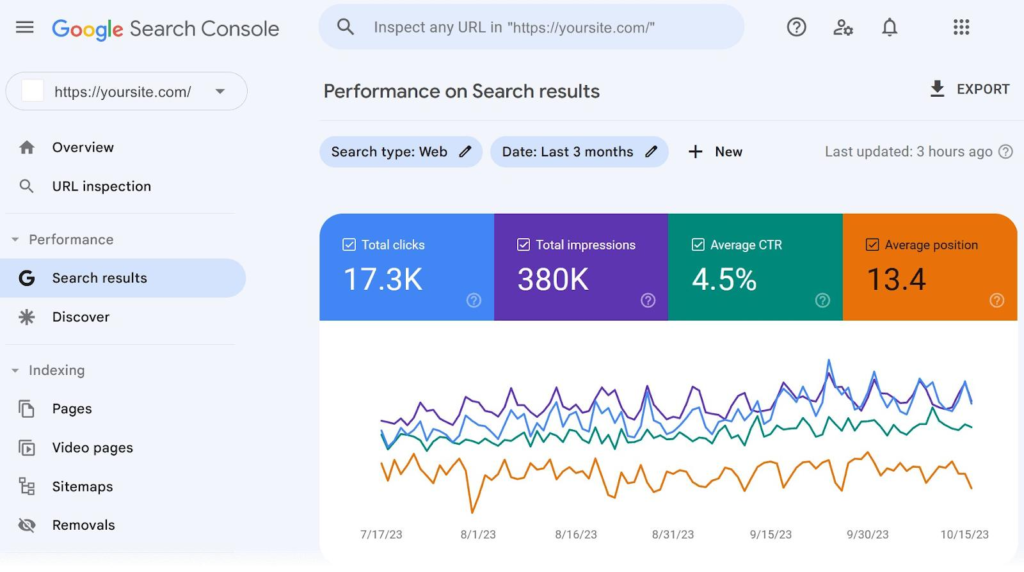
Google Search Console provides information about search impressions, clicks, queries, indexing, and website search performance.
Website owners can use it to identify pages that receive impressions but generate relatively few clicks.
Official website: https://search.google.com/search-console
2. Google PageSpeed Insights
Best for website speed and performance.
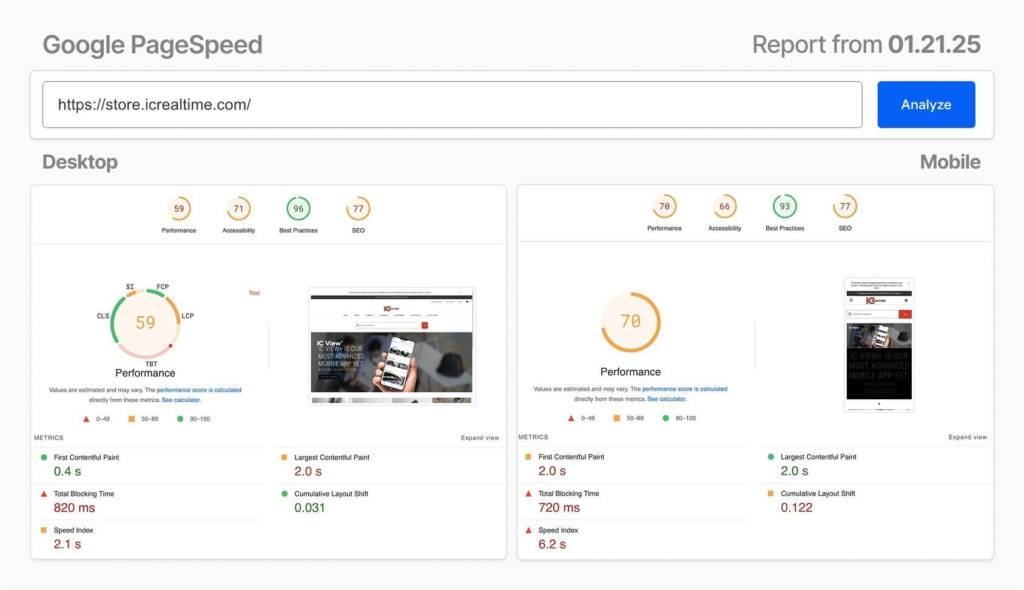
It evaluates page performance and provides diagnostic recommendations for improving loading speed and user experience.
Official website: https://pagespeed.web.dev/
3. Screaming Frog SEO Spider
Best for website crawling and technical checks
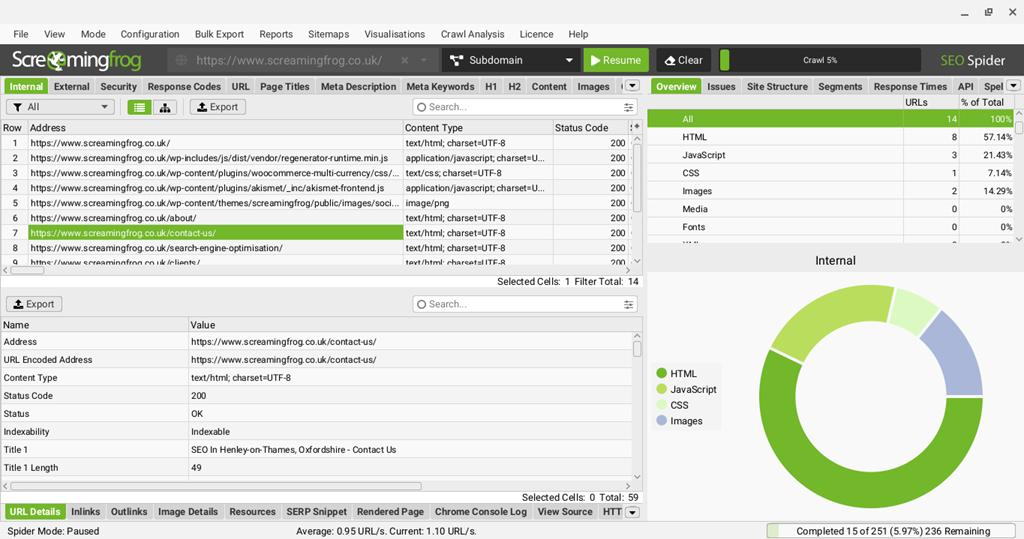
Its free version can crawl up to 500 URLs per website, making it useful for smaller websites and initial technical investigations.
Official website: https://www.screamingfrog.co.uk/seo-spider/
4. Google Rich Results Test
Best for checking eligible structured data.
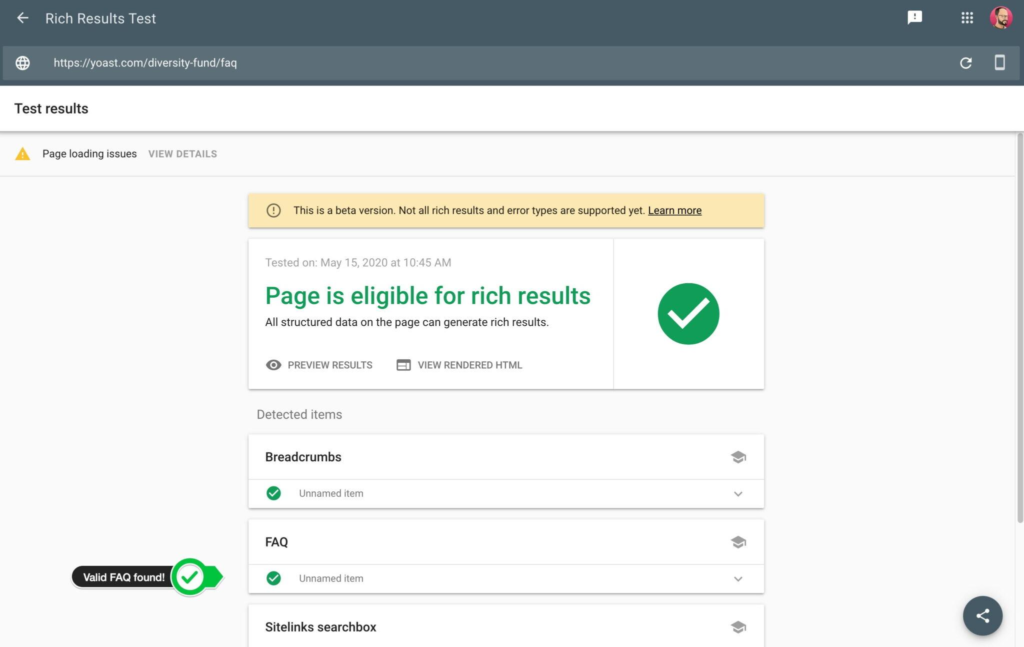
It helps website owners check whether supported structured data can qualify a page for rich result features.
Official website: https://search.google.com/test/rich-results
Using these tools together can provide a more complete picture than relying on a single automated scanner.
How to Read and Understand Your SEO Audit Report
Receiving an audit report is only the beginning. The next step is understanding which findings deserve immediate attention.
A professional report should make its findings easy to understand, even for someone without technical SEO experience.
Understand the Severity of Each Issue
Most audit tools categorise findings into three groups:
- Errors: Problems that may significantly affect crawling, indexing, or website functionality.
- Warnings: Issues that deserve attention but may not immediately affect performance.
- Notices: Smaller recommendations that could improve website quality or optimisation.
However, severity labels differ between tools. Always evaluate the actual impact rather than treating every warning as a ranking problem.
Focus on High-Impact Improvements First
Do not attempt to fix every issue simultaneously.
Start with problems that prevent important pages from being crawled or indexed. Then address broken links, duplicate page elements, content gaps, and performance improvements.
Compare Results Over Time
Run audits periodically and compare the results.
Monitor:
- Organic clicks and impressions.
- Important keyword positions.
- Indexed pages.
- Organic landing-page performance.
- Website speed.
- Conversion rates and enquiries.
Google Search Console is particularly useful for monitoring organic search performance after implementing improvements.
How Often Should You Run a Free SEO Audit?
The ideal frequency depends on website size, publishing activity, and how frequently technical changes occur.
| Website type | Suggested audit frequency |
|---|---|
| Small business website | Every 3–6 months |
| Ecommerce website | Monthly |
| Large business website | Monthly or quarterly |
| Frequently updated blog | Every 1–3 months |
| Newly redesigned website | Immediately after launch |
These are practical planning recommendations rather than Google requirements.
You should also consider running an additional audit after:
- A website redesign.
- A domain migration.
- Major URL structure changes.
- A significant content update.
- Installing new plugins or website features.
- Unexpected declines in organic traffic.
Regular monitoring helps identify emerging problems before they affect a large number of pages.
Can a Free SEO Audit Improve Google Rankings?
A free SEO audit can help improve your website’s SEO by identifying problems that may prevent pages from performing effectively in search results.
However, completing an audit does not automatically improve rankings.
Results depend on several factors, including:
- The quality and relevance of your content.
- Website technical health.
- Competition for targeted keywords.
- Search intent satisfaction.
- Website reputation and relevant backlinks.
- Overall user experience.
- How effectively identified problems are resolved.
For example, correcting a broken internal link can improve navigation and help search engines discover relevant pages. Updating outdated content can make information more useful to visitors.
Google recommends creating helpful, reliable, people-first content rather than relying on shortcuts to achieve higher rankings. Google for Developers+1
How to Choose the Right Free SEO Audit Service
Before choosing an audit platform or service, evaluate its features and reporting quality.
Consider the following questions:
- Does it check technical SEO issues?
- Does it identify indexing and crawling problems?
- Does it analyse page titles and meta descriptions?
- Does it evaluate website speed and mobile performance?
- Does it provide actionable recommendations?
- Does it explain the severity of identified issues?
- Does it offer understandable reports?
- Does it clearly explain its free-plan limitations?
Avoid services that promise guaranteed first-page rankings or claim that a single automated scan can fix every SEO problem.
Businesses requiring more detailed analysis can explore BoostRankify’s SEO services for professional website optimisation support.
For location-specific requirements, BoostRankify also offers SEO services in London and SEO services in Karachi.
Frequently Asked Questions (FAQs)
1. What should a free SEO audit include?
A good free SEO audit should include technical SEO, website speed, mobile usability, on-page optimisation, keyword analysis, internal linking, backlinks, structured data, and actionable recommendations.
It should also identify important issues and explain how to resolve them.
2. Are free SEO audits accurate?
Free SEO audits can provide accurate information about many technical and on-page issues. However, their accuracy depends on the tool, crawling limitations, available data, and website configuration.
Automated reports should be reviewed before making significant SEO decisions.
3. Can I audit my website without paying?
Yes. You can use tools such as Google Search Console, Google PageSpeed Insights, Screaming Frog SEO Spider, and Google Rich Results Test to investigate different aspects of website performance without purchasing a subscription.
Some tools limit the number of URLs or features available in their free versions.
4. How long does a free SEO audit take?
A basic audit of a small website may take only a few minutes using an automated tool. However, a detailed manual review can take several hours or longer, depending on the website’s size and complexity.
5. Does a free SEO audit check backlinks?
Some free audit tools provide limited backlink information, while others focus mainly on technical and on-page SEO.
A detailed backlink assessment may require specialist tools with access to backlink databases.
6. What is the difference between an SEO audit and an SEO analysis?
An SEO audit is generally a structured examination of website issues, performance, and optimisation opportunities.
SEO analysis is broader and may include keyword research, competitor research, search intent, market trends, and ongoing performance evaluation.
7. Should I fix every issue in my SEO audit report?
No. Not every warning represents a serious SEO problem.
Prioritise issues according to their actual impact, affected pages, business importance, and available resources. Some recommendations may be unnecessary or unsuitable for your website.
8. How often should I get a free SEO audit?
For most small business websites, an audit every three to six months is a reasonable starting point. Ecommerce websites and frequently updated websites may benefit from monthly checks.
Additional audits are recommended after major website changes.
Conclusion
A free SEO audit is a valuable starting point for understanding your website’s search engine performance and identifying opportunities for improvement. However, a useful report should offer much more than a list of errors and warnings.
It should evaluate technical SEO, content quality, keyword targeting, website speed, mobile usability, backlinks, internal linking, and structured data. Most importantly, it should provide clear, prioritised recommendations that businesses can use to improve their websites.