
A well-optimised Google Business Profile can help businesses improve their local search visibility, attract potential customers and generate more calls, website visits and enquiries. Whether you run a small local business, restaurant, professional service or multi-location company, having an accurate and complete profile is essential for competing in local search results.
This Google Business Profile optimization checklist explains how to set up, improve and maintain your profile using practical local SEO strategies. It covers business information, categories, reviews, photos, services, local keywords, Google Maps visibility and ongoing performance tracking.
By following these steps, you can build a stronger local presence and make it easier for customers to discover and contact your business.
What Is Google Business Profile Optimization?
Google Business Profile optimization is the process of improving your business listing on Google so customers can find accurate information about your company in Google Search and Google Maps.
A properly optimised profile helps Google understand:
- What your business offers.
- Where your business operates.
- Which products or services you provide.
- When customers can visit or contact you.
- How customers rate and experience your business.
Google’s local results are primarily influenced by relevance, distance and prominence. Businesses cannot directly control every ranking factor, particularly distance, but they can improve profile accuracy, relevance and reputation.
Google Business Profile Optimization Checklist
Use the following checklist to improve your business listing and create a stronger local SEO foundation.
1. Claim and Verify Your Business Profile
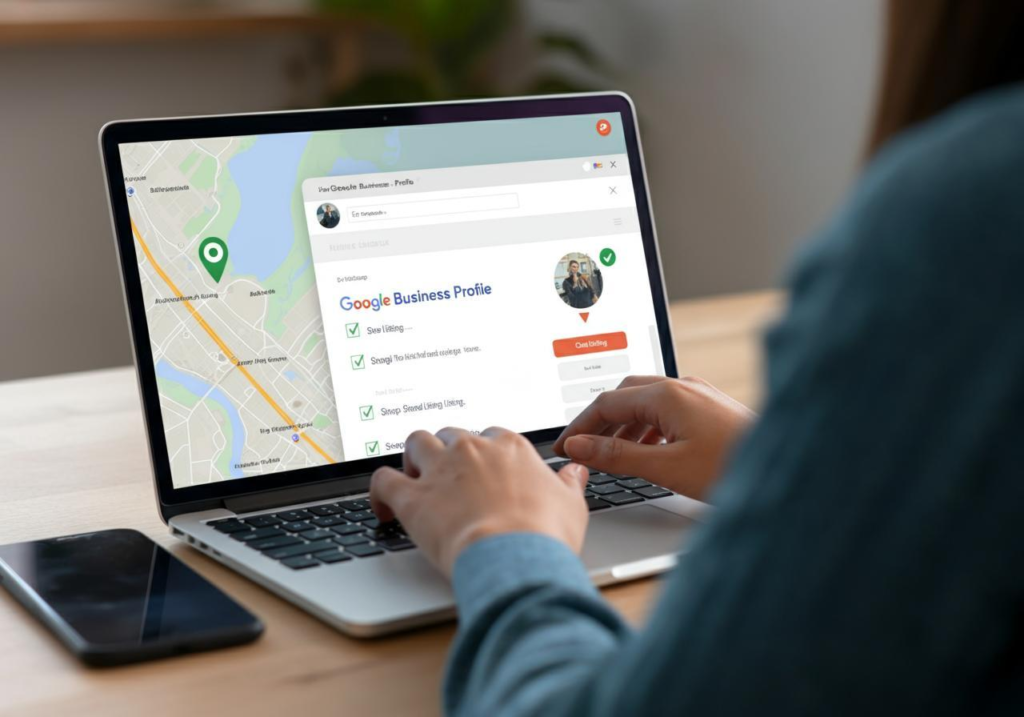
The first step in Google Business Profile optimization is claiming and verifying your business listing.
Verification confirms that you are authorised to manage the profile. It also gives you access to important business information and performance features.
Action checklist:
- Visit Google Business Profile.
- Sign in using your business Google account.
- Search for your existing business listing.
- Claim the profile if it is available.
- Add your business information accurately.
- Complete Google’s available verification process.
- Keep ownership and manager access limited to authorised people.
Avoid creating duplicate profiles for the same business location. Duplicate listings can confuse customers and create management problems.
2. Choose the Correct Business Name
Your business name should match the name customers recognise in the real world.
For example, if your registered and publicly recognised business is called ABC Dental Clinic, use that name rather than adding promotional keywords such as:
- ABC Dental Clinic – Best Dentist in London
- ABC Dental Clinic – Affordable Dentist Near Me
- ABC Dental Clinic – Number One Dental Services
Adding unnecessary keywords to your business name can violate Google’s guidelines and potentially result in profile restrictions or suspension.
Best practice: Use your genuine business name consistently across your website, signage, directories and Google listing.
3. Select the Most Relevant Primary Business Category
Business categories help Google understand what your company does.
Choosing the right primary category is an important part of Google Business Profile optimization because it influences which relevant searches your business may appear for.
For example:
| Business type | Possible primary category |
|---|---|
| Dental clinic | Dentist |
| Italian restaurant | Italian restaurant |
| Digital marketing company | Marketing agency |
| Plumbing company | Plumber |
| Fitness centre | Gym |
Choose the most specific category that accurately describes your main business activity.
You can also add relevant secondary categories when they genuinely represent additional services.
Avoid: Selecting unrelated categories simply to appear in more searches.
4. Complete Every Important Business Information Field
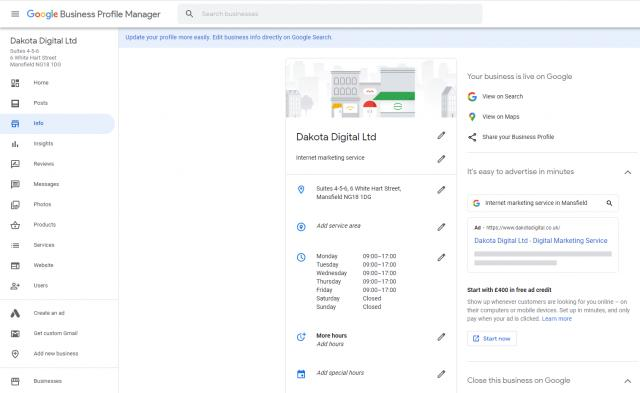
An incomplete profile may leave potential customers without essential information.
A major Google Business Profile optimization task is ensuring that all relevant business details are accurate and consistent.
Complete these fields:
- Business name.
- Business address, where applicable.
- Local phone number.
- Official website.
- Primary and secondary categories.
- Opening hours.
- Holiday and special opening hours.
- Business description.
- Service areas, where applicable.
- Accessibility and other relevant attributes.
For businesses that travel to customers, configure service areas accurately. If customers do not visit your business address, follow Google’s service-area rules rather than displaying an ineligible address.
5. Write an SEO-Friendly Business Description
Your business description gives customers a quick understanding of your company, experience and services.
Write a natural, informative description that explains what you offer and who you serve.
Example:
“ABC Digital Marketing is a professional digital marketing agency providing SEO, local SEO, website optimisation and online advertising services. We help businesses improve their online visibility, connect with potential customers and build a stronger digital presence through practical marketing strategies.”
Description optimisation tips:
- Explain your main services.
- Mention your genuine service locations naturally.
- Include relevant business-related terms.
- Highlight your experience and specialities.
- Use clear, customer-friendly language.
- Avoid repetitive keyword insertion.
- Do not include promotional links in the description.
A good description should help customers understand your business rather than read like a collection of search keywords.
6. Add High-Quality Business Photos and Videos
Visual content makes your profile more informative and helps customers understand what to expect.

For effective Google Business Profile optimization, upload genuine photographs that represent your business.
Consider adding:
- Exterior photographs.
- Interior photographs.
- Team and staff photographs.
- Product images.
- Completed project photographs.
- Service-related images.
- Brand and workplace photographs.
Use clear, high-resolution images that accurately represent your business.
Avoid stock photographs that could mislead customers into believing they show your actual premises, staff or products.
Update your images whenever your premises, products, team or services change.
7. Add Your Products and Services
Your profile should explain exactly what customers can purchase or request.
Depending on your business category and available features, add relevant products, services, descriptions and pricing information.
For example, a digital marketing agency might list:
- Local SEO services.
- Technical SEO audits.
- On-page SEO.
- E-commerce SEO.
- Website optimisation.
- Google Ads management.
Each service should have a clear description explaining its value to customers.
This helps potential customers understand your offering before visiting your website or contacting your business.
8. Collect Genuine Customer Reviews
Customer reviews are important for building trust and strengthening your online reputation.
Google also identifies review quantity and positive ratings as factors associated with local prominence.
An effective Google Business Profile optimization strategy should include a consistent and ethical review-generation process.
How to generate more reviews:
- Ask satisfied customers for honest feedback.
- Share your Google review link after completing a service.
- Include a review request in appropriate follow-up messages.
- Make the review process simple.
- Respond professionally to positive and negative feedback.
Never purchase fake reviews, offer incentives in exchange for reviews or pressure customers to leave only positive feedback.
9. Respond to Every Customer Review

Collecting reviews is only one part of reputation management. Responding to them demonstrates that your business values customer feedback.
For positive reviews:
Thank customers for their feedback and mention something relevant about their experience.
For negative reviews:
- Remain professional.
- Acknowledge the customer’s concern.
- Avoid arguments.
- Provide a practical way to resolve the issue.
- Protect private customer information.
Avoid copying the same generic response under every review. Personalised replies create a more authentic customer experience.
10. Publish Regular Google Business Profile Updates
Google Business Profile offers posting features that eligible businesses can use to share updates with customers.
Depending on available features, you can publish:
- Business announcements.
- New product information.
- Service updates.
- Events.
- Special offers.
- Important operational changes.
Keep posts relevant, accurate and useful.
For example, a restaurant can share a new menu, while a digital marketing agency can publish an update about a new service.
Do not rely on posting frequency alone to improve rankings. Posts should provide genuine value to potential customers.
11. Add Accurate Business Opening Hours
Incorrect opening hours can frustrate customers and lead to missed enquiries.
Check your regular operating hours and update them whenever necessary.
Your Google Business Profile optimization checklist should include:
- Monday-to-Sunday opening hours.
- Weekend schedules.
- Public holiday hours.
- Seasonal opening hours.
- Temporary closures.
- Appointment-based availability, where applicable.
If your business closes temporarily, update the profile rather than allowing customers to rely on outdated information.
12. Maintain Consistent Business Information Across the Web
Your business information should be accurate wherever customers discover your company.
Check your:
- Official website.
- Business directories.
- Industry-specific listings.
- Social media profiles.
- Local citations.
- Relevant professional platforms.
Keep your business name, address and telephone number consistent wherever the same information is displayed.
You can also explore our guide to free business listing sites to discover additional business directory opportunities.
For a broader strategy, consider our local SEO services and UK local SEO services.
13. Optimise Your Website for Local Search
Your Google Business Profile should work alongside your website rather than operate as a separate marketing channel.
A strong website supports local visibility by explaining your services, locations and business expertise.
Important website optimisation activities include:
- Create dedicated service pages.
- Include accurate contact information.
- Display your business location where appropriate.
- Add relevant local keywords naturally.
- Improve mobile usability.
- Use descriptive page titles and meta descriptions.
- Add appropriate LocalBusiness structured data.
- Link your profile to the most relevant website landing page.
For businesses serving multiple locations, create genuinely useful location-specific pages rather than publishing duplicate pages with only city names changed.
BoostRankify also provides SEO services in Karachi, SEO services in London and SEO services in Dubai.
14. Monitor Google Business Profile Performance
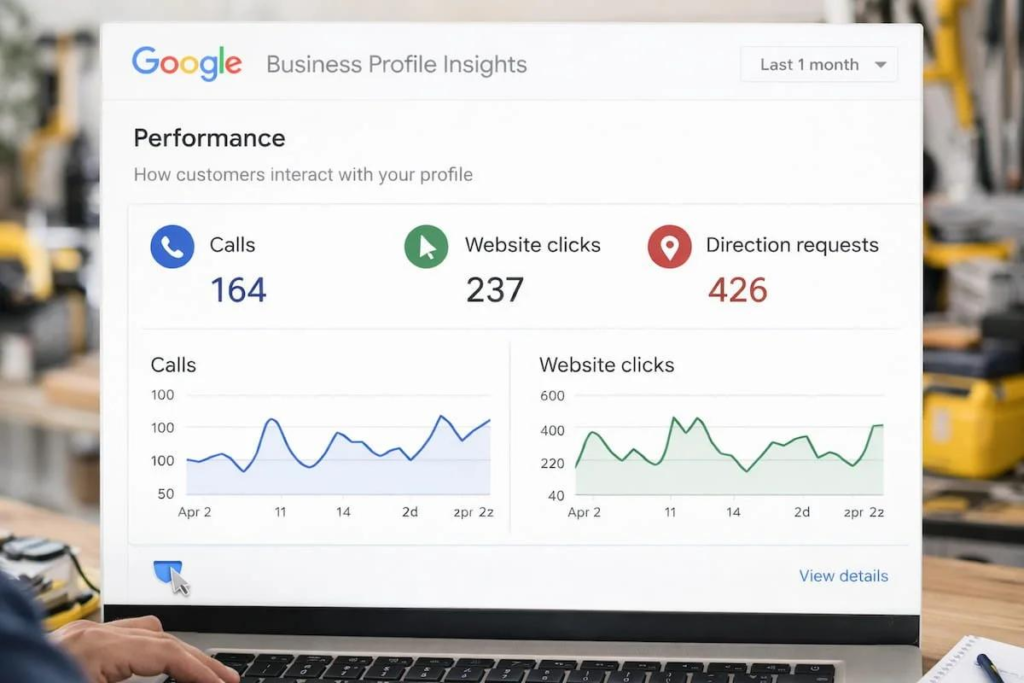
Google provides performance reporting for eligible verified Business Profiles.
Use this information to understand how customers discover and interact with your listing.
Important metrics include:
| Metric | What it tells you |
|---|---|
| Searches | Search terms used to discover your profile |
| Views | Profile visibility on Google Search and Maps |
| Calls | Clicks on your business call button |
| Website clicks | Visits generated through your profile |
| Directions | Requests for directions |
| Bookings | Completed bookings where supported |
Review performance monthly and compare results over time.
For example, if your profile receives more views but fewer calls, consider improving your business description, service information, photographs and contact details.
Remember that views and interactions are not the same as confirmed customers or sales.
15. Avoid Common Google Business Profile Mistakes
Even a well-established business can weaken its local presence through incorrect profile management.
Avoid these common mistakes:
| Mistake | Better approach |
|---|---|
| Keyword stuffing in business name | Use your genuine business name |
| Incorrect business address | Provide an eligible, accurate location |
| Duplicate listings | Maintain one profile per eligible location |
| Fake customer reviews | Collect genuine customer feedback |
| Irrelevant categories | Choose accurate business categories |
| Outdated opening hours | Update regular and special hours |
| Poor-quality photographs | Upload genuine, clear images |
| Ignoring customer reviews | Respond professionally |
| Inaccurate service areas | List only areas genuinely served |
Following Google’s official guidelines helps reduce the risk of profile problems and improves the reliability of your business information.
16. Follow Google’s Official Business Profile Guidelines
Google has specific policies governing business names, addresses, service areas, descriptions and profile eligibility.
Before making major changes, review the following official resources:
- Google’s local ranking improvement guide
- Google Business Profile representation guidelines
- Google Business Profile editing instructions
- Google Business Profile performance reporting
Google explains that local rankings are primarily influenced by relevance, distance and prominence. There is no guaranteed method or payment that can secure a higher organic local ranking. Google Business Profile Help+1
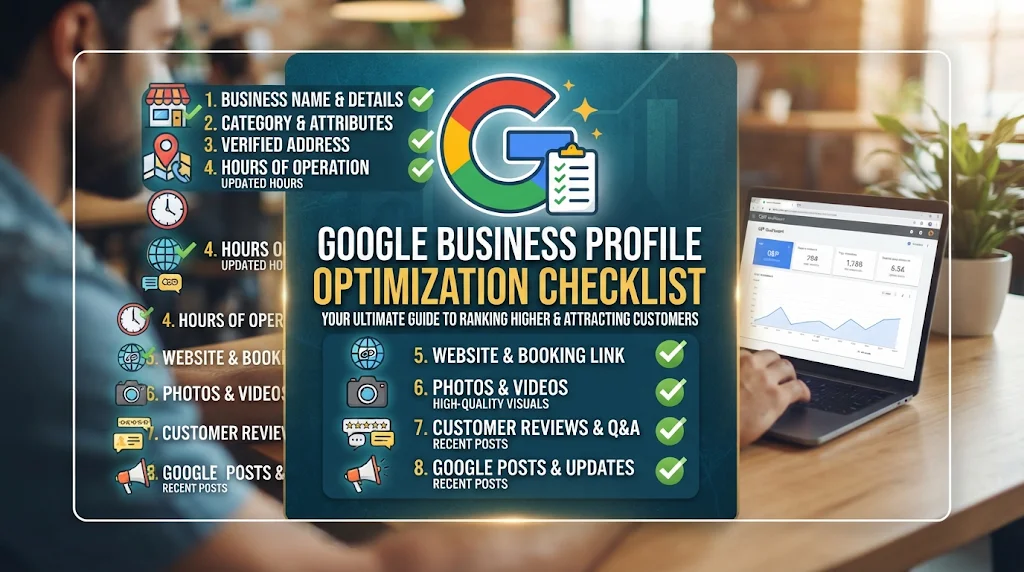
Google Business Profile Optimization Checklist: Quick Review
Use this checklist when auditing an existing profile or setting up a new business listing.
- Claim and verify your business.
- Use your genuine business name.
- Select the correct primary category.
- Add relevant secondary categories.
- Complete all important business information.
- Write an informative business description.
- Upload genuine business photographs.
- Add relevant products and services.
- Collect authentic customer reviews.
- Respond to positive and negative reviews.
- Publish useful business updates.
- Maintain accurate opening hours.
- Check business information across directories.
- Optimise your website for local searches.
- Monitor profile performance.
- Follow Google’s business representation policies.
Completing these tasks provides a practical foundation for effective Google Business Profile optimization. However, maintaining accurate information and regularly reviewing customer interactions should be an ongoing process rather than a one-time activity.
Frequently Asked Questions (FAQs)
1. What is Google Business Profile optimization?
Google Business Profile optimization involves improving your business listing on Google Search and Maps by updating business information, categories, services, photographs, reviews and other relevant details.
2. Does Google Business Profile optimization improve local rankings?
Yes, maintaining a complete and accurate profile can help Google understand your business and match it with relevant local searches. However, rankings also depend on distance and prominence, so higher rankings cannot be guaranteed.
3. How often should I update my Google Business Profile?
Review your profile at least monthly. Update it immediately whenever your business address, contact details, services, opening hours or other important information changes.
4. Which business category should I select?
Choose the most specific primary category that accurately represents your main business activity. Add secondary categories only when they describe additional services your business genuinely provides.
5. Do Google reviews help local SEO?
Reviews contribute to your business’s prominence and reputation. Genuine customer feedback and professional responses can also help potential customers make informed decisions.
6. How many photos should I upload to Google Business Profile?
There is no universal number that guarantees better rankings. Start with clear photographs representing your premises, team, products and services, then add new images whenever relevant.
7. Can a service-area business use Google Business Profile?
Yes. Eligible businesses that travel to customers can create a profile and specify their service areas. If customers do not visit the business address, the address should generally be hidden.
8. How can I track Google Business Profile performance?
Use the Performance section of your verified profile to monitor available metrics, including searches, views, calls, website clicks and direction requests.
9. Is Google Business Profile free?
Yes. Creating and managing a Google Business Profile is free. Businesses may separately invest in professional SEO services, website improvements or paid advertising.
10. Can I manage multiple business locations?
Yes. Eligible businesses can manage multiple genuine locations. Each location should have accurate information and meet Google’s individual business eligibility requirements.
Conclusion
Google Business Profile optimization is an important part of building a strong local online presence. From selecting the right business category and updating contact information to collecting customer reviews and monitoring performance, every step contributes to a more informative and trustworthy business listing.
The key is consistency. Keep your profile accurate, publish useful updates, respond to customers and make sure your website supports your local SEO strategy.
If you want to improve your Google Maps visibility, attract more local customers and develop a stronger search presence, professional support can help you build a structured strategy.